As I just wasted time watching a Youtube video, I need to keep it short:This sucks | |
Posts mit dem Label Android Studio werden angezeigt. Alle Posts anzeigen
Posts mit dem Label Android Studio werden angezeigt. Alle Posts anzeigen
Mittwoch, 14. November 2018
Error: Could not generate unknown file: Attempt to reopen a file for path \app\build\generated\source\kapt\debug\

Samstag, 21. Januar 2017
Android issue: No acceptable module found. Local version is 0 and remote version is 0.
If you should ever experience the problem, that your Android app does not start at all and crashes upon loading with a rather meaningless error message such as:
This might be due to the device running an old version of Google Play Services.
Usually, Google Play Service is automatically updated - however, sometimes devices might lag behind - and especially in the case of running on an emulator - Google Play Services will not update at all.
If you get this only when running an emulator, please remove the current AVD and create a new one - if one that includes latest Google Play Services already,
No acceptable module found. Local version is 0 and remote version is 0.
This might be due to the device running an old version of Google Play Services.
Usually, Google Play Service is automatically updated - however, sometimes devices might lag behind - and especially in the case of running on an emulator - Google Play Services will not update at all.
If you get this only when running an emulator, please remove the current AVD and create a new one - if one that includes latest Google Play Services already,
Montag, 1. Februar 2016
Android Studio. FAILURE: Build failed with an exception. Could not resolve https://
A common issue with Android Studio behind Corporate Firewalls is fetching dependencies from HTTPS Urls:
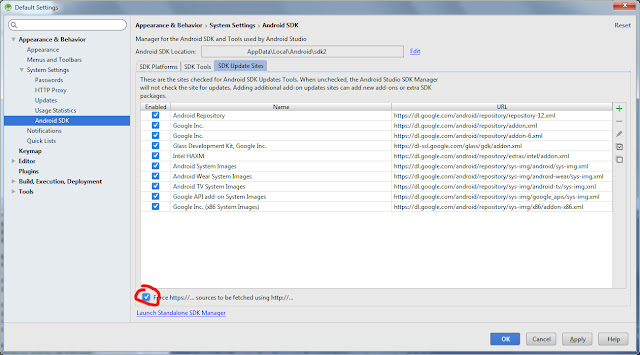
FAILURE: Build failed with an exception.The easy solution is to tick the checkbox that says, Android Studio should fallback to http instead of https:
* What went wrong:
A problem occurred configuring project ':app'.
> Could not resolve all dependencies for configuration ':app:_debugCompile'.
> Could not resolve com.facebook.android:facebook-android-sdk:4.9.0.
Required by:
flirtbox_flirtbox-android:app:unspecified
> Could not resolve com.facebook.android:facebook-android-sdk:4.9.0.
> Could not get resource 'https://jcenter.bintray.com/com/facebook/android/facebook-android-sdk/4.9.0/facebook-android-sdk-4.9.0.pom'.
> Could not GET 'https://jcenter.bintray.com/com/facebook/android/facebook-android-sdk/4.9.0/facebook-android-sdk-4.9.0.pom'.
> Connection to https://jcenter.bintray.com refused
> Could not resolve com.facebook.android:facebook-android-sdk:4.9.0.
> Could not get resource 'https://oss.sonatype.org/content/repositories/snapshots/com/facebook/android/facebook-android-sdk/4.9.0/facebook-android-sdk-4.9.0.pom'.
> Could not GET 'https://oss.sonatype.org/content/repositories/snapshots/com/facebook/android/facebook-android-sdk/4.9.0/facebook-android-sdk-4.9.0.pom'.
> Connection to https://oss.sonatype.org refused
> Could not resolve com.facebook.android:facebook-android-sdk:4.9.0.
> Could not get resource 'https://maven.fabric.io/public/com/facebook/android/facebook-android-sdk/4.9.0/facebook-android-sdk-4.9.0.pom'.
> Could not GET 'https://maven.fabric.io/public/com/facebook/android/facebook-android-sdk/4.9.0/facebook-android-sdk-4.9.0.pom'.
> Connection to https://maven.fabric.io refused
* Try:
Run with --stacktrace option to get the stack trace. Run with --info or --debug option to get more log output.

Abonnieren
Posts (Atom)